.png?width=50&height=50&name=eimmigration-symbol-320x320%20(2).png)
Developers have been busy building new functionality to make your casework easier. Now you can capture electronic signatures on any document, collaborate more easily on forms, restore deleted files without a support ticket, and so much more. See what's new in eimmigration.
Document Signing
Capture electronic signatures for any PDF
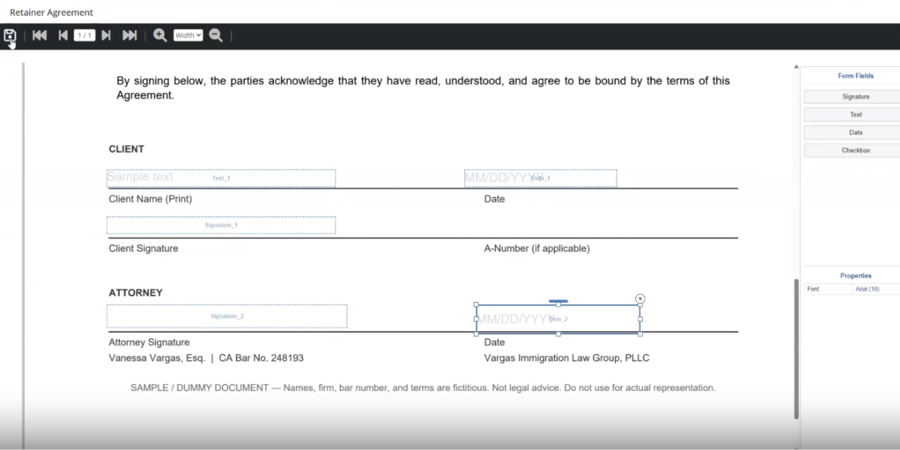
With Document Signing, you can upload any PDF, add signature and text fields, and send it out for signature to one or multiple parties, all without leaving eimmigration.
- Make it easy for clients to sign retainer agreements and start working with you.
- Add any PDF and place signature and text fields exactly where you need them.
- Send documents to multiple signers at once, see who's signed, and easily follow up with those still pending.
- Signers can review and sign from any device—no printing, scanning, or mailing required.
- A tamper-evident seal marks every signature, so no one can alter documents after signing.
Form Comments
Collaborate at a whole new level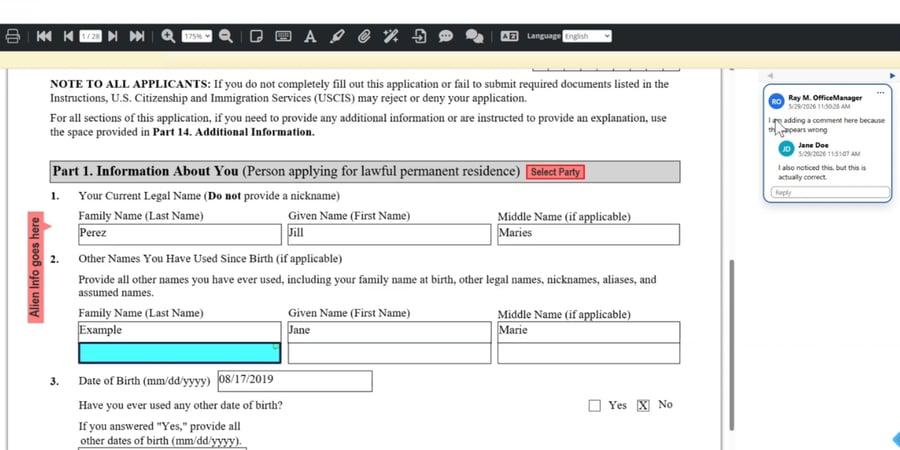
Form Comments turns every form into a shared workspace where your staff and clients can work together on each one. So your team can get answers, make corrections, and ensure nothing falls through the cracks.
- Add comments directly on a form and have threaded conversations tied to specific fields, so feedback always stays in context.
- Staff and clients can collaborate on addendum pages in the same environment, keeping everyone aligned through to completion.
- Assigned caseworkers receive notifications when someone responds to the comment.
Soft Delete
Undo accidental deletions without waiting on support
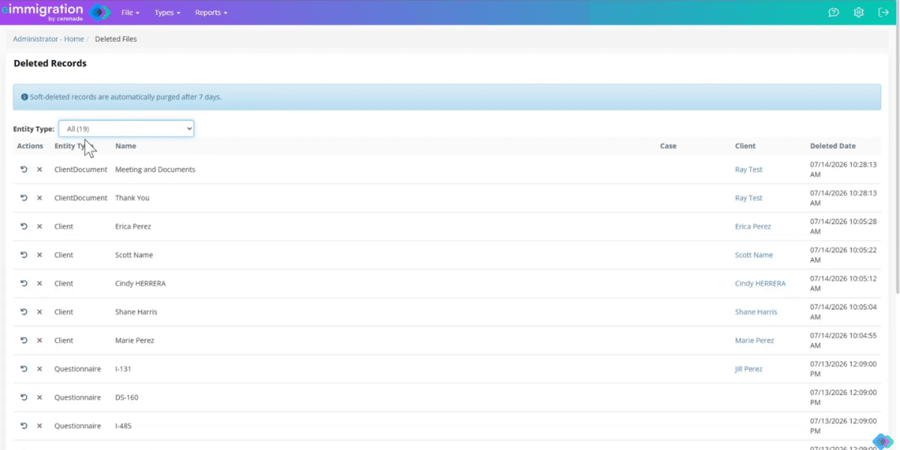
Now admins can restore deleted client and case data directly through your admin account. No support ticket required.
- Restore an accidentally deleted client or case, or just a single item within it, like a document, right from admin.
- Deleted items stay recoverable for 7 days before they're permanently removed.
- Filter deleted items by client, case, or specific document to quickly find what you need to restore.
- Skip the support ticket. What used to require a database lookup from our team, you can now do yourself in a few clicks.
Microsoft Bookings Integration
Let clients book appointments. No back-and-forth.
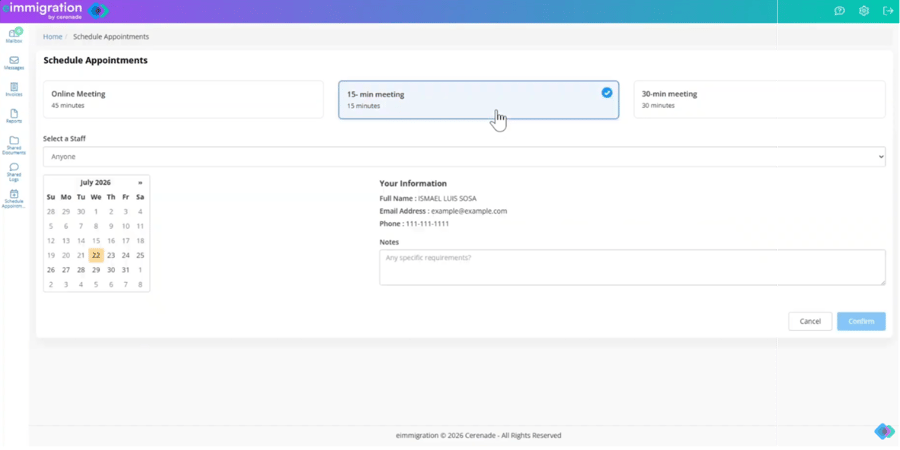
Connect your Microsoft Bookings calendar to the client portal, so clients can see your real-time availability and schedule appointments themselves.
- Sync your Microsoft Bookings calendar directly to the client portal.
- Maintain full control over who can view your availability and book time.
- Clients can view real-time availability and self-book appointments, no calls or emails required.
- Appointments sync back to your Microsoft Bookings calendar.
- Clients receive automatic confirmations and reminders via Microsoft Bookings, reducing no-shows.
Microsoft Bookings is available through our Scheduling module. If you don’t already have access to Scheduling, email hello@eimmigration.com to request it.
ICYMI: eimmigration for Outlook Add-In
Instantly sync emails to client & case records
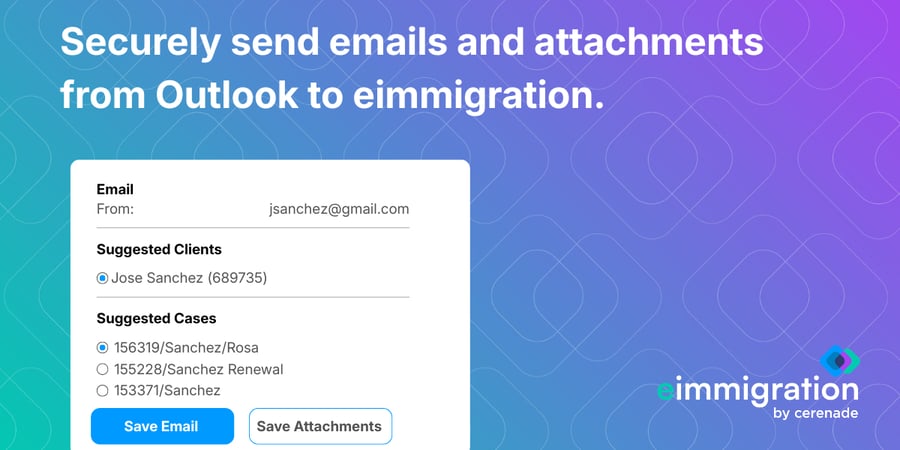
Never search your inbox for a client email or document again. With eimmigration’s new Outlook Add-In, it’s easier than ever to keep all your case and client communications in one place.
- Simply authorize Outlook to securely access your clients and cases.
- Outlook can then locate client profiles and associated cases in eimmigration based on the sender or recipient of any email.
- Choose which client and case record you want to save the email or attachments to.
- Outlook will instantly send the content to the corresponding client or case in eimmigration.
eimmigration Resource Center
Access how-tos, training & support from one place.
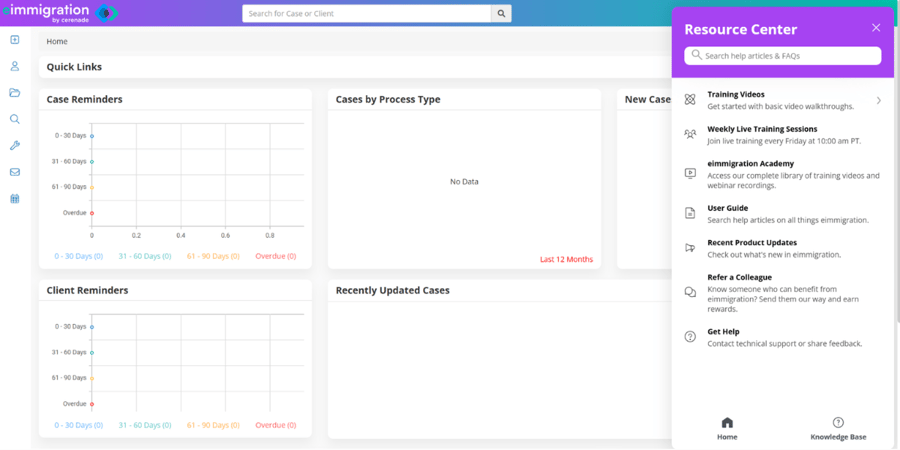
Between the User Guide, eimmigration Academy, and training webinars, it can be hard to quickly find answers to your how-to questions. Now all eimmigration help and training resources are accessible from one easy place.
Just click on the help icon in your top menu to access your new Resource Center. You'll have instant access to:
- Search the User Guide, Knowledge Base, and eimmigration Academy.
- Watch the most commonly viewed training videos.
- Register for live weekly training sessions.
- Contact technical support or share feedback.
Small changes that make a big difference
- Easier message filtering: Quickly filter for unread messages in your inbox by turning on the Unread toggle.
- More secure password resets: Reset passwords now expire in 24 hours if caseworkers or clients don't log in with the new password.
- No more re-mapping custom fields: Automatically copy custom fields to new form versions.
- New "Relationship" value: You can now select "Former Employee" as a default relationship value.
- Streamlined refunds: Automatically zero out balances when issuing refunds.